Resource Centre Equipment Loan
Institution: Resource Centre in Polytechnic/University manages shared equipment: laptops, projectors, cameras, PA systems, extension cables for classes, events and student projects.
Main Problem: Current method uses printed record book and paper forms. Record may not represent actual availability. Approval delayed when lecturer cannot be contacted. Incomplete condition records cause disputes when damaged equipment returned. Borrowers waste time completing forms only to find item unavailable.
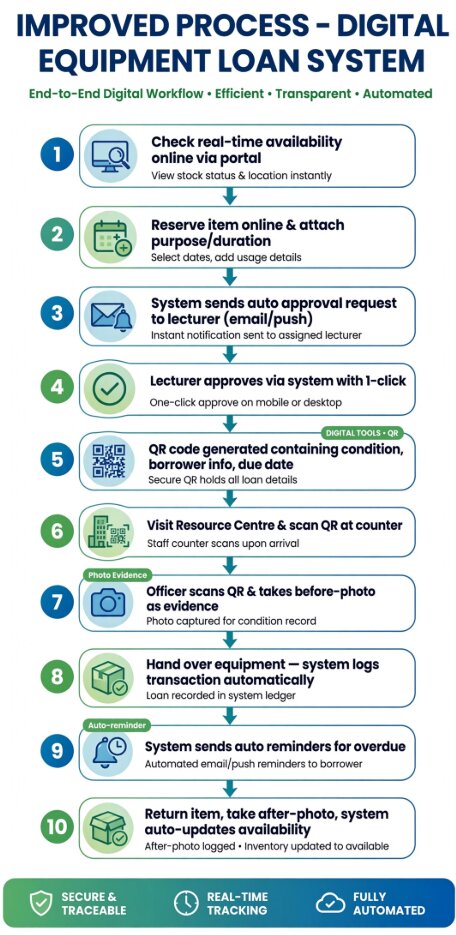
Expected Result: Digital Equipment Management System - Users check availability online, reserve online, obtain approval online. Each item has QR code containing condition, borrower's information and due date. Photographs recorded before and after every loan. System sends reminders for overdue and updates availability immediately after return.
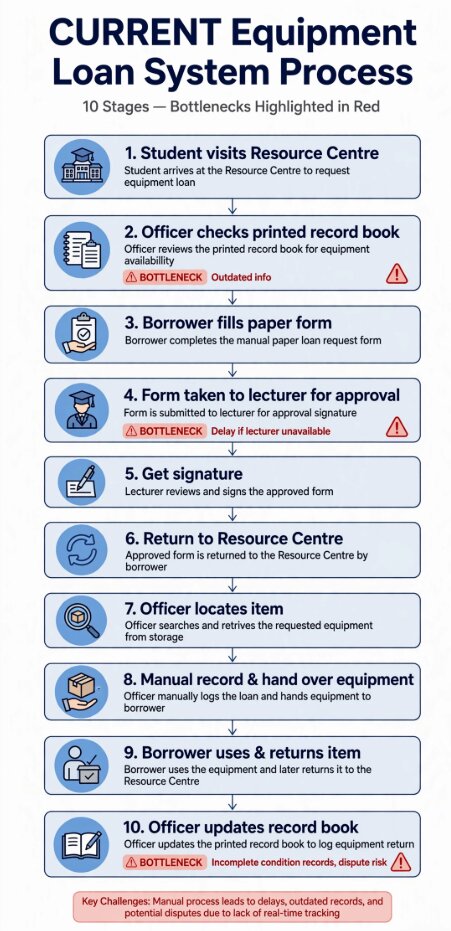
5 Problems If Inefficient Process Unresolved
1. Double Booking & Wasted Trips
Student fills form only to find item unavailable because book outdated. Affected: Students, Lecturers needing equipment for class. Consequence: Class/event delayed, frustration.
2. Approval Delays Cause Event Failure
Lecturer in meeting cannot sign, form stuck 2 days. Affected: Borrower, Event Organizer, Participants. Consequence: Program cancelled.
3. Damage Disputes & Unfair Fines
No photo record of existing scratches, student blamed. Affected: Students (financial penalty, trust issue). Consequence: Conflict with Resource Centre.
4. Equipment Loss & Overdue Not Returned
No reminder, student forgets 3 months. Affected: Institution - asset loss, next borrower cannot use. Consequence: Budget waste.
5. Heavy Admin Workload & Human Error
Officer writes same info 3 times, handwriting hard to read. Affected: Resource Centre Staff, Management. Consequence: Inefficient, inaccurate audit.
5 Clear Precautions
Using Avoid..., Do not..., Make sure..., Remember to...
Improved Process in Passive Voice (All Steps Passive + Sequence Connectors Highlighted)
Next, the request is reviewed and approved by the lecturer via one-click online approval. A confirmation email is generated by the system and received by the borrower. A QR code containing condition, borrower information and due date is generated by the system.
Then, the QR code is scanned by the officer at the Resource Centre and a before-photo of equipment is taken and recorded by the officer as evidence. The equipment is handed over by the officer and transaction is automatically logged by the system.
After that, the equipment is used by the borrower for approved period and overdue reminders are sent automatically by the system via SMS/email if not returned on time.
Finally, the equipment is returned by the borrower, an after-photo is taken by the officer for comparison, and availability is immediately updated as available by the system in real-time and made visible by the system to next borrower.
Sequence connectors used (highlighted yellow): First, Next, Then, After that, Finally
Brief Explanation - Required by Website Task
1. Reduce Delays: Current requires 2 physical visits + manual search for lecturer. Improved requires 1 visit only - borrower checks and reserves online, system sends auto notification to lecturer who approves via phone. Time from 2-3 hours to 10 minutes.
2. Reduce Errors: Current uses handwritten book - outdated, handwriting error. Improved uses QR code containing exact condition, borrower info, due date. Before/after photo eliminates human error about who damaged item. Prevents double booking via real-time database.
3. Reduce Repeated Work: Current officer writes same info 3 times (form, logbook, return book). Improved auto-updates availability immediately after return, auto sends reminders for overdue, auto logs transaction. No repeated manual entry.
Conclusion: Digital flow transforms inefficient paper-based dispute-prone process into 100% paperless, transparent, accountable system as per Expected Solution.
Design Decisions
Corporate Theme: Navy #0a1931 + Royal Blue #2563eb + White - professional for Resource Centre. Fonts: Inter + Plus Jakarta Sans - readable on mobile. Navigation: Fixed header with anchor links. Layout: Card + Grid + Bottleneck/Benefit color coding. Originality: Flowcharts custom drawn for Situation 04, not copied from other groups, colour-coded red for bottlenecks, green for digital benefits.
Group Members - Group 04
| Name | Matric | Role |
|---|---|---|
| MUHAMMAD KHAIRUL IKHWAN BIN ANUAR | 19DIT26F1234 | Student A: a + b |
| MUHAMMAD ZAHIN BIN ZULBAHRY | 19DIT26F1218 | Student B: c + d |
| NORSHAHMI DANIEL BIN NORADZUAN | 19DIT26F1044 | Student C: e |
| AFIF AMSYAR BIN MOHD FAIZAL | 19DIT26F1052 | Student D: f + g,h,i |
References: Assignment Brief Situation 04 Equipment Loan System (MPU22355), Resource Centre SOP Polytechnic, MPU22355 Lecture Notes on Process Writing & Passive Voice, draw.io for flowchart creation, Google Fonts (Inter, Plus Jakarta Sans). All flowcharts and graphics are original work created for academic purpose only.